WELCOME Abdennour : Software engineer

Showing posts with label Data Mining. Show all posts

Apr 18, 2012

Data Mining Tutorial


1.Weka Quick Start :
   
>    Download Weka for linux , for Windows . An How to open it?
>    Explorer Environement under weka

2.  Weka labs:
   
>    with weka.
>    with weka . 

>   with weka


Lab3: Simple K-Means(Unsupervised): (With Weka)

TO DO (Not Yet)

Lab2 : Decision Tree


TODO . (NOT YET)
classify >J48>Cross Validation
=== Run information ===

Scheme:weka.classifiers.trees.J48 -C 0.25 -M 2
Relation:     iris
Instances:    150
Attributes:   5
              sepallength
              sepalwidth
              petallength
              petalwidth
              class
Test mode:10-fold cross-validation

=== Classifier model (full training set) ===

J48 pruned tree
------------------

petalwidth <= 0.6: Iris-setosa (50.0)
petalwidth > 0.6
|   petalwidth <= 1.7
|   |   petallength <= 4.9: Iris-versicolor (48.0/1.0)
|   |   petallength > 4.9
|   |   |   petalwidth <= 1.5: Iris-virginica (3.0)
|   |   |   petalwidth > 1.5: Iris-versicolor (3.0/1.0)
|   petalwidth > 1.7: Iris-virginica (46.0/1.0)

Number of Leaves  :  5

Size of the tree :  9


Time taken to build model: 0.04 seconds

=== Stratified cross-validation ===
=== Summary ===

Correctly Classified Instances         144               96      %
Incorrectly Classified Instances         6                4      %
Kappa statistic                          0.94
Mean absolute error                      0.035
Root mean squared error                  0.1586
Relative absolute error                  7.8705 %
Root relative squared error             33.6353 %
Total Number of Instances              150    

=== Detailed Accuracy By Class ===

               TP Rate   FP Rate   Precision   Recall  F-Measure   ROC Area  Class
                 0.98      0          1         0.98      0.99       0.99     Iris-setosa
                 0.94      0.03       0.94      0.94      0.94       0.952    Iris-versicolor
                 0.96      0.03       0.941     0.96      0.95       0.961    Iris-virginica
Weighted Avg.    0.96      0.02       0.96      0.96      0.96       0.968


=== Confusion Matrix ===

  a  b  c   <-- classified as
 49  1  0 |  a = Iris-setosa
  0 47  3 |  b = Iris-versicolor
  0  2 48 |  c = Iris-virginica


-if confidence Factor discreased , We have

=== Confusion Matrix ===

  a  b  c   <-- classified as
 49  1  0 |  a = Iris-setosa
  0 46  4 |  b = Iris-versicolor
  0  4 46 |  c = Iris-virginica
==>if confidence Factor discreases  Error numbers increases


20.png

  a  b  c   <-- classified as
 15  0  0 |  a = Iris-setosa
  0 19  0 |  b = Iris-versicolor
  0  2 15 |  c = Iris-virginica


=========
kmeans
1)with 2 clusters:


=== Run information ===

Scheme:weka.clusterers.SimpleKMeans -N 2 -A "weka.core.EuclideanDistance -R first-last" -I 500 -S 10
Relation:     iris
Instances:    150
Attributes:   5
              sepallength
              sepalwidth
              petallength
              petalwidth
              class
Test mode:evaluate on training data

=== Model and evaluation on training set ===


kMeans
======

Number of iterations: 7
Within cluster sum of squared errors: 62.1436882815797
Missing values globally replaced with mean/mode

Cluster centroids:
                                          Cluster#
Attribute                Full Data               0               1
                             (150)           (100)            (50)
==================================================================
sepallength                 5.8433           6.262           5.006
sepalwidth                   3.054           2.872           3.418
petallength                 3.7587           4.906           1.464
petalwidth                  1.1987           1.676           0.244
class                  Iris-setosa Iris-versicolor     Iris-setosa


Time taken to build model (full training data) : 0.03 seconds

=== Model and evaluation on training set ===

Clustered Instances

0      100 ( 67%)
1       50 ( 33%)


2)With 3 clusters:

=== Run information ===

Scheme:weka.clusterers.SimpleKMeans -N 3 -A "weka.core.EuclideanDistance -R first-last" -I 500 -S 10
Relation:     iris
Instances:    150
Attributes:   5
              sepallength
              sepalwidth
              petallength
              petalwidth
              class
Test mode:evaluate on training data

=== Model and evaluation on training set ===


kMeans
======

Number of iterations: 3
Within cluster sum of squared errors: 7.817456892309574
Missing values globally replaced with mean/mode

Cluster centroids:
                                          Cluster#
Attribute                Full Data               0               1               2
                             (150)            (50)            (50)            (50)
==================================================================================
sepallength                 5.8433           5.936           5.006           6.588
sepalwidth                   3.054            2.77           3.418           2.974
petallength                 3.7587            4.26           1.464           5.552
petalwidth                  1.1987           1.326           0.244           2.026
class                  Iris-setosa Iris-versicolor     Iris-setosa  Iris-virginica


Time taken to build model (full training data) : 0.01 seconds

=== Model and evaluation on training set ===

Clustered Instances

0       50 ( 33%)
1       50 ( 33%)
2       50 ( 33%)


==============
Wich Attributs for better Classification in kmeans ?
=> petallength(inter/ intra Class)
28_intraInter_patellength.png

=> petallewidth(inter/ intra Class)
29_intraInter_patellength.png

Lab1: Classification (Supervised): (With Weka)


In this lab you will learn about using weka using the database iris.arff you find it  in the folder: ~ / weka-3-6/data/Iris.arff.
This is a basic donnnées, very famous, with 150 examples of flowers described by four attributes of continuing value and belonging to three classes.


1.DATA :
1>Open firstly file Iris.arff with a text editor to discover the format ARFF (Attribute Relation File Format) :

2>Click on the button "O". Choose the data file. / Data / Iris.arff:


Some information will appear in the window

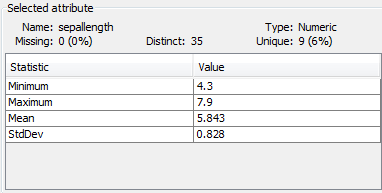
In the pane "SelectedAttribute", you can get basic statistics for the selected attribute: Name, Type, Missing, Unique, distinct, Vlaur Min / Max.

Select SepalLength Attribut:

Select SepalWidth ATTribut  : 


Select PetalLength :


Select PetalWidth :

Select Class:

So we have : 
     >>>Blue Color => Iris-Setosa
     >>>Red Color => Iris-versicolor
     >>>Last Color => Iris-virginica

-Click on Visualize All : 


==>We Note that the overlap(chevauchement(fr))  between classes is minimal when we have classification based on attribute petal (Either  petalLength or petalWidth).


-Weka offers the possibility to operate by pretreatment by applying a filter on attributes:
- Click on Choose Button >supervised>attribute>Discretize :
==>This filter allows to discretize continuous values


2.Data visualization :

For a first approach to classification, go in the "Visualize" Tab. You will see a set of 25 graphics:


1. Change the axes to achieve a classification that gives off the lower of decision rules


-When X-> PetalWidth && Y -> SepalLength , We give off a minimal number of  Decisions Rules : 


Decisions Rules (Règles de décision(fr)) :
 -if(X>=0.1) AND(X<=0.6) Then Class<-- Iris-Setosa.
-if(X>=1) AND(X<=1.7)  AND(Y<=5.6) Then Class<-- Iris-Versicolor.
-if(X>=1.8) AND(X<=2.5)  Then Class<-- Iris-virginica.
-if(Y>=7.1)  Then Class<-- Iris-virginica.
......

=>This is the best classification in comparison with other classifications. In effect, the overlap between classes is minimal


Tuto 2 :WEKA Environment Explorer


1.Open weka.jar & click on Explorer : 


A new window opens "WEKA Knowledge Explorer" with six tabs:
a.Preprocess: to select a file, inspect and prepare the data.
b.Classify: To CHOOSE, implement and test different classification algorithms: in our case this would be a decision tree algorithm.
c.Cluster: To Choose, apply and test the segmentation algorithms.
d.Associate: To apply the algorithm for generating association rules.
e.Select Attributes: To choose the most promising attributes.
f.Visualize: to display (in two dimensions) certain attributes in other functions.


Tuto1 : "Weka" => Quick Start

1.Download Weka :
       a.For linux : Click Here to download
       b.For Windows : Click Here to download.
2.Open Weka:
       a.With linux (Ubuntu): 

  •     Open terminal in ./weka-3-6-0/ folder .
  •     $  PATH=$PATH:.
  •     $ chmod 777 *
  •     $ weka.jar &

       
 And you will get this UI : 
       
     b.With Windows :

  •                     install weka .
  •                     go to <%PATH_OF_INSTALLATION%>\weka-x-y\
  •                      Double Click on weka.jar

                  And you will get this UI:


3. Weka Environments:
   After you run it, you get the window title WEKA GUI CHOOSER with the following environments:   
    a.Explorer:  

                                an environment for exploring data    
      b. Experimenter:
                  an environment to perform experiments and statistical tests between the learning patterns.
      c.KnowledgeFlow :it's such as Explorer but it's an environment with "Drag &Drop" UI and
      d.Simple CLI :
                                command line interface.